New to Aussie resumes? Start with the Australian resume format guide. It walks you through the section order, the details to skip and a full worked example.
Righto. Applying online usually means a program reads your file before a person does, so make that job easy for it.
Most of it comes down to layout and honesty. Keep the file plain enough that every word comes out in order, then use the job ad's words for the things you can really do. You'll get both here, plus a before and after for Mick Dundee, a made-up team leader in Brisbane.
Keen to see how your own file reads first? The free resume check takes a minute and needs no account.
What does an ATS do with your resume?
An applicant tracking system, or ATS, is the software an employer uses to run a job ad. It collects each application, stores it and lets the recruiter search, sort and move people through stages.
Many systems also try to read your uploaded file. They pull out the text and sort it into boxes: name, contact details, jobs, dates, education, skills. If the file comes out scrambled, those boxes fill with the wrong things, like fleeces landing in the wrong bins of a woolshed. A recruiter searching them may never find you.
Some employers also add screening questions to the form, such as work rights or a licence the job needs. Answer those exactly as asked, because they sit apart from your resume.
In the Australian Public Service, people still read applications. The Australian Public Service Commission says the agency's selection panel assesses the responses of all applicants, usually to build a shortlist for an interview or another assessment, and that every applicant is assessed against the strengths of all the others.[1] So you write for 2 readers. The software needs a clean file, and the person needs facts that fit the job.
Which Australian employers and job boards use one?
Plenty do, and they don't all use the same product. Here's what we could source on 20 November 2026.
| Where | What we found | Read on |
|---|---|---|
| NSW Government jobs | I work for NSW publishes Taleo training guides for the recruiters and hiring managers who use the NSW Government's e-Recruitment system, and the system's job pages sit on jobsnsw.taleo.net.[2] | 20 Nov 2026 |
| Australian Public Service | APSJobs advertises roles. When you apply, it sends you to the agency's own recruitment site, with its own login, and each agency runs its own selection process.[3] | 20 Nov 2026 |
That's a short list on purpose. We only name an employer when a public page backs it up, and employers change systems.
For the rest, you can work it out yourself. Click Apply on the ad and read the web address you land on, the way a bushwalker checks the trail marker before heading off. If it isn't the job board, you're probably in the employer's own system, or one run by its recruiter.
Whichever product sits behind the button, the advice below holds. Each one wants a clean, readable file.
What file and layout read cleanly?
Plain formatting reads cleanly. Software is after the text, so a fancy design can cost you more than it earns. Think of a good tin shed: it keeps the rain off and nobody asks for frills.
| Do this | Why |
|---|---|
| Save as a Word file or a PDF made from Word, with real text | Software pulls out the text. A scan or screenshot is a picture of words, and a system without text recognition gets nothing from it. |
| Use one column from top to bottom | Some software reads a page in one line from left to right, so side-by-side columns can mix 2 lists into one. |
| Skip layout tables and text boxes | Some readers pass over what sits inside them, so a job or a skill goes missing. |
| Keep your phone and email in the main text, away from the page edges | Some software has trouble reading headers and footers, so anything placed there may be missed. |
How should you set out headings, dates and fonts?
Once the file reads, the parts inside it need to be easy to find, like gear in a well-packed ute tray.
| Do this | Why |
|---|---|
| Use plain section names | Career summary, Key skills, Work history, Education and Referees tell the software where each part starts. |
| Give every job a title, employer, suburb and dates | Month and year, such as "Mar 2023 to Present", in the same style each time. Some systems work out your time in each job from these dates. |
| Use standard bullets and one common font | Calibri or Arial at 11 or 12 point. Icons and fancy symbols can turn into squares. |
| Use A4 and write numbers and dates the Australian way | A4 is the Australian paper size, and Australian spelling matches the words an Australian ad uses. |
These map to checks in the free resume check, which runs 68 tests in 18 checks across 4 groups: Text and extraction, Layout and reading order, Sections and details, and Hidden content and manipulation. The ones above are Text can be extracted, Characters read correctly, Reading order, Layout tables, Text boxes and floating objects, No text locked in images, Contact details readable, Headers and footers, Standard sections found, Work entries found, Dates tied to roles and Unusual page size.
Want the full layout rules for an Australian resume, like length and what to leave off? They're in the Australian resume format guide.
How do you match a job ad's wording honestly?
Read the ad for the skills and duties it asks for, then use its terms for the things you really do. Recruiters often search by the words the ad used, a bit like a bowerbird picking out the blue bits. They go for the pieces they know, so a match helps you get found.
Step 1
Pull out the ad's own terms
Underline the repeated nouns and tools. Here's an invented ad for the job Mick is chasing.
How do you reword your lines to match the ad?
Step 2
Check each term against your real work
Mick has done all of this work, but he described it in his own words. Here's how he sorted his wording.
| Mick first wrote | The ad says | Mick now writes |
|---|---|---|
| Complaint handling | resolve escalated complaints | Complaint resolution |
| Coaching and call quality checks | coach agents, complete call quality assurance | Call quality assurance and coaching |
| Check calls each week and coach staff one on one | call quality assurance | Check call quality each week and coach staff one on one |
| Handle escalated complaints and close most within five business days | resolve escalated complaints | Resolve escalated complaints, closing most within five business days |
The facts stay the same and only the labels change. An interviewer can ask about any line and Mick can answer it.
Write an abbreviation and its full name once each, such as "Working with Children Check (WWCC)", so a search for either one finds you.
What if the ad asks for something you haven't done?
Step 3
Leave out what you cannot back up
A skill you don't have never belongs on the page. If the ad asked for something Mick had never done, he'd leave it off. A line you can't explain costs you in the interview and in a reference check.
Keen on a job that names a tool you've touched once? Say how much you used it.
See how your file reads.
Upload your resume to the free check and get a score, with each fix listed by group. No account needed.
Check my resume freeDo keyword stuffing and white text work?
Nah. Both can hurt you. They're well-known tricks, and a careful reader checks for them.
Keyword stuffing
This means repeating the ad's words over and over, or pasting a long block of them at the bottom. It makes the page hard for a person to read, and the word list looks like exactly what it is. The free check has a named check for it, Keyword stuffing.
Use each term where it belongs, in your skills and in the job lines where you used it. Then move on.
White text and hidden words
The trick is to type keywords in white on a white page, so only software sees them. It's like a possum hiding behind a downpipe. You can still see the tail.
The check lists No hidden text or character tricks and Faint text among its checks for this reason.
Instructions to an AI screener
Some people hide a line telling an AI reader to rank them first. It has the same problem. The check names it too: No instructions aimed at AI screeners. Write for the person and keep the file honest.
What does a before and after look like?
Mick's first draft used a 2-column Word template with a skills sidebar and his phone number in the page header. It looked flash. A program reading in a straight line takes one pass across the page, like a mower going across 2 backyards in one go. It would have run the skills into his jobs and missed the phone number.
His skills land in the middle of his job, and his contact details are gone. His check came back under 80, in the Needs work band, with fixes under Layout and reading order and under Sections and details.
So he changed 4 things:
- He moved to one column and removed the sidebar.
- He moved his phone number and email into the body.
- He gave Key skills a section of its own.
- He matched the wording of 4 lines to the ad, using only work he had done.
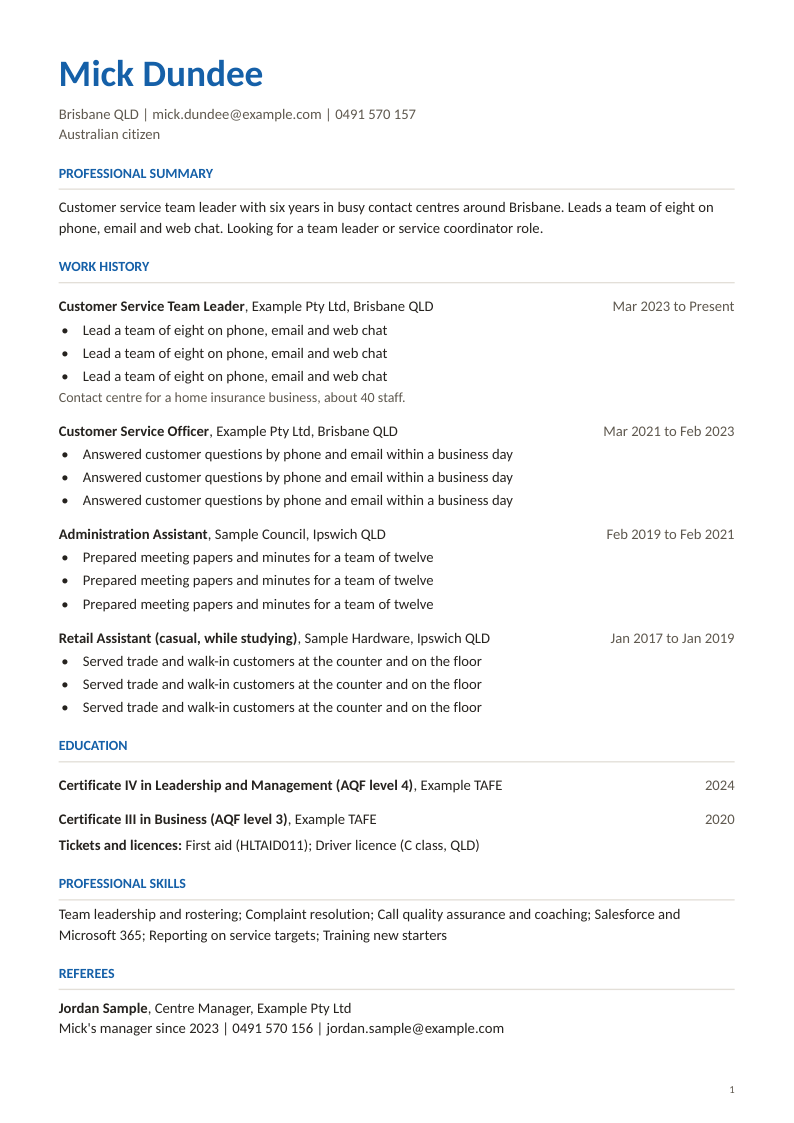
His next check landed in the Strong band, which is 90 and up. Here's the finished resume in the Classic template.
Build a resume Check my resume free
Quick answers
What is an ATS-friendly resume?
Righto. It is a resume whose text a program can read in order, with plain headings, one column and dates on every job.
Should I send a PDF or a Word file?
Follow the ad. If it does not say, a PDF made from Word keeps your layout and still holds real text. Send Word when the ad or the upload page asks for it.
Do I need the exact words from the job ad?
Use them for skills and duties you really have. Leave out any that are not true of you.
Do I have to tailor my resume for every job?
Adjust your skills and the lines closest to the ad each time. The facts about your work stay the same.
Does white text help me get past an ATS?
Nah. Anyone can reveal it, and it can count against you. The free check has a named check for hidden text. Fair dinkum.